

Description
Download FlashAir Utility – WiFi SD Card, Realtime File Transfer, Multiplatform
Overview
The FlashAir utility is a Chrome App designed to facilitate seamless interaction with Toshiba’s FlashAir(TM) WiFi-enabled SD memory cards. This tool enables users to access, manage, and transfer files directly from the SD card to their local device using a secure wireless connection. It is particularly useful for photographers, field researchers, and content creators who need immediate access to media stored on the card without requiring physical removal.
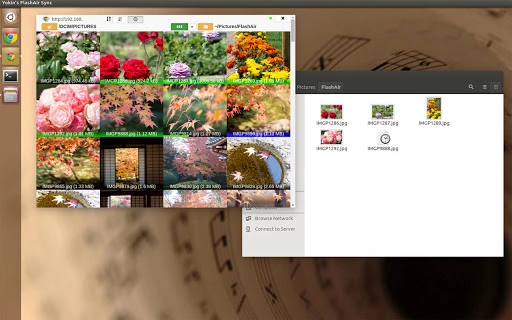
By leveraging Chrome’s web platform, the application offers a modern, responsive interface that dynamically displays thumbnails of files stored on the FlashAir device. The software supports multiple operating systems, including Windows, Linux, and Mac OS X, making it accessible across diverse computing environments. Its core function revolves around establishing a stable connection to the FlashAir host device and enabling real-time file transfer, which enhances workflow efficiency in on-the-go scenarios.
Target users include professionals who rely on wireless data access and individuals managing large media libraries. The developer, Yokinsoft Jake.Y.Yoshimura, has released the tool under the GPLv3 open-source license, ensuring transparency and community-driven development. While no additional details about the developer’s background are available, the open-source nature of the project suggests a commitment to accessibility and long-term usability.
Key Features & Capabilities
- Realtime File Transfer: Enables immediate data transfer from the FlashAir SD card to the local drive, reducing delays in post-processing workflows.
- Responsive Thumbnail Display: Provides a dynamic, modern interface that renders file thumbnails in real time, improving visual navigation and file selection.
- Connection Indicator: Displays current connectivity status with the FlashAir host device, helping users monitor the stability of the wireless link.
- Multiplatform Compatibility: Runs on Windows, Linux, and Mac OS X where Chrome is installed, ensuring broad accessibility across different systems.
- Open-Source Foundation: Released under the GPLv3 license, allowing users to inspect, modify, and distribute the source code.
These features collectively support efficient file management in remote or mobile settings. For example, a photographer at a live event can connect to a FlashAir card via Wi-Fi and transfer high-resolution images directly to their laptop without interrupting the shoot. Similarly, a field researcher can upload sensor data from a camera-equipped device to a local computer in real time. The open-source model also encourages customization, allowing advanced users to adapt the tool to specific needs.
User Interface, Workflow & Performance
The user interface is built around Chrome’s app environment, delivering a clean and intuitive layout. Navigation is straightforward, with a central area dedicated to displaying file thumbnails and a status panel showing the connection indicator. The responsive design adjusts dynamically to screen size, ensuring usability across different devices.
Workflow efficiency is enhanced by the direct integration with the FlashAir card’s wireless network. Once connected, users can browse files and initiate transfers with minimal steps. The interface updates in real time, reflecting changes on the SD card as they occur. However, exact performance details such as CPU or RAM usage were not specified by the developer.
Stability appears to be consistent with typical Chrome Apps, though no formal benchmarks or crash reports are available. The application relies on the underlying Chrome runtime and the reliability of the FlashAir device’s Wi-Fi connection. General software behavior patterns suggest predictable performance under standard conditions. No issues related to resource consumption or freezing were reported in the provided documentation.
Compatibility & System Requirements
The FlashAir utility is compatible with Windows, Linux, and Mac OS X operating systems. It requires Chrome to be installed on the host device, as the application is built as a Chrome App. The installation size is 1.2 MB, indicating a lightweight footprint.
Exact system requirements were not listed by the developer. This includes details on minimum processor speed, RAM, or disk space. Compatibility with specific Chrome versions is also not documented. The software was tested on Windows 8.1, Ubuntu 15, Mac OS X, and Chrome OS, suggesting broad compatibility with modern systems. However, users should ensure that their Chrome browser is up to date to maintain functionality.
Pros and Cons
Pros
- Free and open-source under GPLv3 license
- Realtime file transfer from WiFi SD card to local drive
- Modern, responsive, and dynamic thumbnail interface
- Supports multiple platforms: Windows, Linux, Mac OS X
- Lightweight installation at just 1.2 MB
Cons
- Requires Chrome browser to run (no standalone version)
- Exact system requirements not specified
- Limited to FlashAir firmware version 1 (as per version 0.9.5)
- No official support for newer FlashAir firmware versions
- Performance metrics and resource usage details not provided
FAQ Section
Is the FlashAir utility compatible with all FlashAir devices?
The utility is compatible with FlashAir firmware version 1, as indicated by version 0.9.5. Compatibility with newer firmware versions has not been confirmed.
Can I use this tool without installing Chrome?
No, the FlashAir utility is a Chrome App and requires the Chrome browser to be installed on the host device.
Is the software secure to use?
The tool uses standard Wi-Fi connections for file transfer. While the application itself is open-source and transparent, security depends on the network environment and FlashAir device configuration.
How do I update the FlashAir utility?
Updates are managed through the Chrome Web Store. Users should ensure their Chrome browser is updated and check for available updates within the app’s settings.
Can I use this tool offline?
While the application runs locally, it requires an active Wi-Fi connection to the FlashAir device. It cannot function without being connected to the FlashAir host.
Final Thoughts + CTA
The FlashAir utility offers a reliable, lightweight solution for users needing real-time access to files stored on WiFi-enabled SD cards. Its multiplatform support, open-source nature, and seamless integration with Chrome make it a practical tool for professionals and hobbyists alike. Despite its age and limited compatibility with newer firmware, it remains functional for users with FlashAir devices running firmware version 1.
For those working with Toshiba’s FlashAir cards in environments where wireless file transfer is essential, this tool delivers on its core promise. The combination of a modern interface, real-time updates, and secure data handling makes it a standout choice among similar utilities.
Download FlashAir Utility now
Guides & Tutorials for Yokin's FlashAir Sync App for Chrome
How to install Yokin's FlashAir Sync App for Chrome
- Click the Preview / Download button above.
- Once redirected, accept the terms and click Install.
- Wait for the Yokin's FlashAir Sync App for Chrome download to finish on your device.
How to use Yokin's FlashAir Sync App for Chrome
This software is primarily used for its core features described above. Open the app after installation to explore its capabilities.
User Reviews for Yokin's FlashAir Sync App for Chrome 0
No reviews found





